Free Office Inventory Management Template + Guide to Tracking Office Supplies
Managing office supplies might seem like a small part of running a business, but without an organized system, everyday purchasing can quickly become inefficient. From running out of printer paper at the worst possible moment to ordering products your workplace already has in storage, poor inventory management can lead to unnecessary expenses, wasted time, and frustrated employees.
Whether you’re an office manager overseeing daily operations, an administrative professional responsible for purchasing, or a business owner looking to reduce workplace expenses, having a reliable way to track office supplies can make a meaningful difference.
That’s where an office inventory management template comes in.
Instead of relying on scattered spreadsheets, handwritten lists, or last-minute supply orders, businesses can use a centralized inventory tracker to monitor stock levels, identify when products need to be reordered, and maintain better visibility over purchasing needs.
In this guide, we’ll explain how to organize and manage office supply inventory, share practical strategies for avoiding unnecessary purchases, and provide a free downloadable Office Source inventory management template to help you get started.
What Is Office Inventory Management?
Office inventory management is the process of tracking, organizing, and replenishing the supplies a business needs to operate efficiently. This includes everyday workplace essentials such as printer paper, pens, notebooks, filing materials, ink and toner, cleaning products, and breakroom supplies.
An effective office inventory management system helps businesses understand what supplies they currently have, how quickly those supplies are being used, and when additional products should be ordered.
Without a consistent tracking process, organizations may experience duplicate purchases, unexpected supply shortages, unnecessary spending, and disorganized storage areas.
By using an office inventory management template, businesses can centralize their supply information, monitor inventory levels, and make more informed purchasing decisions.
Whether managing a small office or coordinating supplies across multiple departments, maintaining an organized inventory helps create a more predictable and efficient workplace.
Why Businesses Should Track Office Supply Inventory
Keeping track of office supplies is about more than knowing how many pens or boxes of paper are in storage. Effective inventory management can help businesses control purchasing expenses, reduce waste, and keep employees equipped with the materials they need.
Reduce Unnecessary Office Supply Spending
Without an organized inventory system, businesses may purchase products they already have or order more than they realistically need.
Tracking quantities and purchasing patterns helps office managers identify excess inventory and make more informed buying decisions.
Prevent Unexpected Supply Shortages
Running out of printer paper, toner, or other frequently used products can interrupt daily operations.
An inventory management system helps businesses recognize when supplies are running low so replacements can be ordered before shortages become a problem.
Improve Purchasing Efficiency
When supply information is scattered across departments, ordering can become inconsistent and difficult to manage.
A centralized office inventory spreadsheet gives purchasing teams a clearer picture of what needs to be ordered, helping reduce duplicate purchases and unnecessary administrative work.
Create Better Budget Visibility
Tracking office supply quantities and estimated replenishment costs can help businesses understand their purchasing requirements.
Over time, this information can support more accurate office supply budgets and help organizations identify opportunities to improve purchasing efficiency.
Download Your Free Office Inventory Management Template
Keeping your workplace stocked shouldn’t require complicated software or hours of manual tracking.
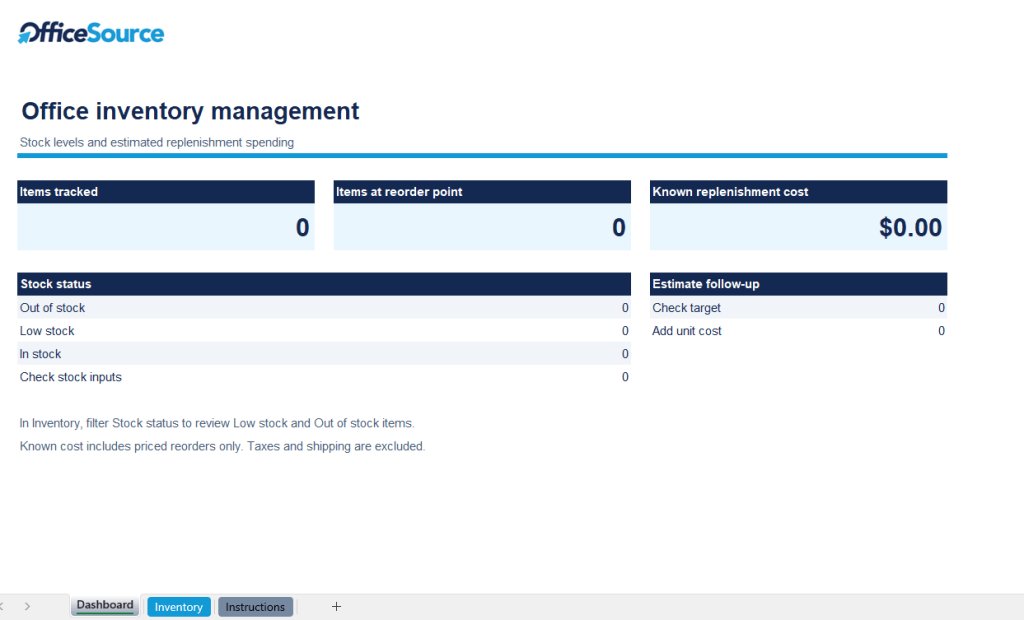
Office Source has created a free office inventory management template to help businesses organize their supplies, monitor stock levels, and simplify purchasing decisions.
The downloadable Excel spreadsheet is designed to help office managers and administrative teams maintain a centralized record of their workplace inventory.
With an organized inventory tracker, your business can:
Keep office supply information in one convenient location.
Monitor available quantities and minimum stock levels.
Identify products that may need replenishment.
Track suppliers and estimated purchasing costs.
Maintain a more consistent office supply ordering process.
No complicated setup required. Download the spreadsheet, customize it for your workplace, and begin tracking your office supplies.
How to Use an Office Inventory Management Template
An office inventory management template provides a structured way to record supply information and identify when products need to be reordered.
Follow these steps to create a more organized purchasing process.
Step 1: List Your Office Supplies
Start by identifying the products your business uses regularly.
Common office inventory categories include:
Paper and printing supplies
Pens, pencils, and writing materials
Filing and organizational products
Breakroom supplies
Cleaning and facility supplies
Technology accessories
General workplace essentials
Organizing products by category makes your inventory easier to review and maintain.
Step 2: Record Your Current Inventory
Count the supplies currently available in your office, storage room, or supply cabinets.
Enter each product into your inventory spreadsheet along with its current quantity.
For businesses with multiple departments, consider assigning responsibility for maintaining inventory records to a designated employee or purchasing coordinator.
Step 3: Establish Minimum Stock Levels
Determine the minimum quantity your workplace should maintain for each frequently used product.
For example, an office that regularly uses printer paper might establish a minimum stock level of five reams.
When the available quantity reaches that level, it’s time to review whether additional supplies should be ordered.
Minimum stock levels should reflect actual usage, supplier lead times, and the importance of each product to daily operations.
Step 4: Track Suppliers and Purchasing Costs
Record the supplier associated with each product and its approximate unit cost.
This information helps businesses understand where supplies are purchased and estimate the cost of replenishing inventory.
Reviewing supplier information may also reveal opportunities to consolidate purchasing through fewer vendors.
Step 5: Review and Update Your Inventory Regularly
An inventory spreadsheet is most useful when the information remains accurate.
Establish a consistent schedule for reviewing stock levels and updating quantities as supplies are received or used.
Smaller offices may find a weekly review sufficient, while larger organizations or high-volume environments may require more frequent updates.

How to Set Reorder Points for Office Supplies
One of the most useful parts of office inventory management is knowing when to reorder products.
A reorder point is the inventory level at which a business should begin the replenishment process.
For example, imagine your office uses approximately 10 reams of printer paper each week, and your supplier typically requires one week to deliver an order.
If you also want to maintain five additional reams as a buffer, your reorder point would be:
10 reams for expected demand during delivery + 5 reams of safety stock = 15 reams
When your available inventory reaches 15 reams, you would begin the reordering process.
This approach helps businesses account for normal usage and supplier delivery times instead of waiting until products are completely depleted.
Reorder points should be reviewed periodically, particularly when employee counts, purchasing patterns, or supplier delivery schedules change.
Tip: A minimum stock level and a reorder point are not always the same. For simple office supply tracking, businesses may use one threshold, but more advanced inventory systems can distinguish between the two.
Best Practices for Managing Office Supplies
Even a basic office inventory spreadsheet can become a valuable management tool when paired with consistent purchasing practices.
Centralize Office Supply Storage
Whenever practical, keep frequently used supplies in designated storage areas.
Organized shelves, labeled bins, and clearly identified product categories make inventory counts easier and help employees locate the materials they need.
Assign Responsibility for Inventory Tracking
Designate an office manager, administrative employee, or purchasing coordinator to oversee inventory updates.
Clear responsibility helps prevent inconsistent recordkeeping and duplicate orders.
Standardize Frequently Purchased Products
Review whether departments are purchasing multiple variations of similar products unnecessarily.
Standardizing frequently used items can simplify ordering, reduce confusion, and make inventory easier to manage.
Review Purchasing Patterns
Look for products that are consistently overordered, rarely used, or frequently unavailable.
These patterns can help your organization adjust minimum stock levels and improve future purchasing decisions.
Consolidate Office Supply Vendors When Practical
Working with multiple suppliers can create additional administrative tasks, separate invoices, and inconsistent ordering processes.
For some organizations, consolidating office supply purchasing through a dependable business supplier can simplify procurement and reduce the time spent managing vendors.
Common Office Inventory Management Mistakes to Avoid
Even businesses with an inventory system can experience purchasing challenges when their processes aren’t maintained consistently.
Here are several common mistakes to watch for.
Waiting Until Supplies Run Out
Ordering only after an item is depleted can lead to avoidable interruptions.
Establishing reorder thresholds helps businesses plan ahead.
Failing to Update Inventory Records
An outdated spreadsheet can create a false picture of available inventory.
Make sure employees responsible for inventory management update quantities consistently.
Ordering Without Checking Existing Stock
Purchasing products without reviewing current quantities can lead to unnecessary spending and excess inventory.
Check your inventory tracker before placing new orders.
Storing Supplies Across Too Many Locations
When products are scattered throughout a workplace, employees may not realize that additional supplies are already available.
Centralizing storage where practical improves visibility and reduces duplicate purchases.
Ignoring Changes in Workplace Needs
Office supply requirements can change as businesses grow, hire employees, introduce new equipment, or adjust their operations.
Review your inventory system regularly to ensure purchasing levels reflect current needs.

Simplify Office Supply Purchasing With Office Source
Managing office inventory is only one part of maintaining an efficient workplace. Businesses also need dependable access to the supplies they use every day.
At Office Source, we help organizations simplify workplace purchasing by providing access to a wide range of business office supplies, including paper products, printer supplies, filing materials, breakroom essentials, cleaning products, and everyday workplace necessities.
As a St. Louis-based workplace solutions provider, Office Source understands that businesses need more than a place to order products. They need a dependable purchasing partner that can help reduce vendor complexity and support daily operations.
Whether your organization is looking to streamline office supply ordering or consolidate more of its workplace purchasing, our team can help you explore available solutions.
Explore our Business Office Supplies in St. Louis and learn how Office Source can support your workplace.
Frequently Asked Questions About Office Inventory Management
What is an office inventory management template?
An office inventory management template is a spreadsheet or tracking document used to organize and monitor workplace supplies. It typically includes product names, categories, available quantities, minimum stock levels, supplier information, and purchasing costs.
How do you keep track of office supplies?
Businesses can track office supplies by maintaining a centralized inventory spreadsheet, recording available quantities, establishing reorder thresholds, and updating inventory regularly. Assigning responsibility for tracking supplies can also improve accuracy.
What should be included in an office supply inventory spreadsheet?
A useful office supply inventory spreadsheet should include product names, categories, current quantities, minimum stock levels, suppliers, unit costs, and reorder information. Businesses may also track storage locations and purchasing dates.
How often should office inventory be checked?
The ideal review frequency depends on the size of the organization and how quickly supplies are used. Some small businesses may only need weekly inventory checks, while larger workplaces may benefit from more frequent monitoring.
Can Excel be used for office inventory management?
Yes. Excel is a practical option for businesses that want to track office supplies without investing in dedicated inventory management software. A structured spreadsheet can help organize inventory information, monitor quantities, and identify purchasing needs.
How can businesses reduce office supply costs?
Businesses can improve cost control by tracking existing inventory, avoiding duplicate purchases, standardizing frequently used products, reviewing purchasing patterns, and consolidating suppliers when appropriate.
Is an office inventory management template suitable for small businesses?
Yes. Small businesses can benefit from an inventory template because it provides a simple way to monitor supplies, establish purchasing routines, and avoid unnecessary orders without requiring complex inventory software.
Take Control of Your Office Supply Inventory
Effective office inventory management doesn’t have to be complicated.
With a consistent tracking process, clearly established reorder levels, and a centralized inventory spreadsheet, businesses can improve purchasing visibility, reduce unnecessary spending, and keep essential workplace supplies available.
Whether you’re managing a small office or coordinating purchasing across multiple departments, the right inventory system can make everyday operations more organized and predictable.
Ready to get started? Download the free Office Source Inventory Management Template and begin building a more efficient office supply purchasing process today.
One vendor. Every solution. A better way to run your workplace.